http://www.cyberciti.biz/faq/unix-linux-bash-find-out-the-exit-codes-of-all-piped-commands
How do I get exit status of process that's piped to another (for e.g. 'netstat -tulpn | grep nginx') on a Linux or Unix-like system using a bash shell?
A shell pipe is a way to connect the output of one program to the input of another program without any temporary file. The syntax is:
command1 | command2 | commandN
OR
command1 | filter_data_command > output
OR
get_data_command | verify_data_command | process_data_command | format_data_command > output.data.file
Sample outputs:
![Fig.01: Find the exit status of pipe command]()
![Fig.02: Use the PIPESTATUS array variable to get the exit status of each element of the pipeline]()
How do I get exit status of process that's piped to another (for e.g. 'netstat -tulpn | grep nginx') on a Linux or Unix-like system using a bash shell?
A shell pipe is a way to connect the output of one program to the input of another program without any temporary file. The syntax is:
command1 | command2 | commandN
OR
command1 | filter_data_command > output
OR
get_data_command | verify_data_command | process_data_command | format_data_command > output.data.file
How to use pipes to connect programs
Use the vertical bar (|) between two commands. In this example, send netstat command output to grep command i.e. find out if nginx process exits or not in the system:# netstat -tulpn | grep nginxSample outputs:

Fig.01: Find the exit status of pipe command
How to get exit status of process that's piped to another
The syntax is:command1 | command2OR
echo"${PIPESTATUS[@]}"
command1 | command2PIPESTATUS is an array variable containing a list of exit status values from the processes in the most-recently-executed foreground pipeline. Try the following commands:
echo"${PIPESTATUS[0]} ${PIPESTATUS[1]}"
Sample outputs:
netstat -tulpn | grep nginx
echo"${PIPESTATUS[@]}"

true | true
echo"The exit status of first command ${PIPESTATUS[0]}, and the second command ${PIPESTATUS[1]}"

true | false
echo"The exit status of first command ${PIPESTATUS[0]}, and the second command ${PIPESTATUS[1]}"

false | false | true
echo"The exit status of first command ${PIPESTATUS[0]}, second command ${PIPESTATUS[1]}, and third command ${PIPESTATUS[2]}"
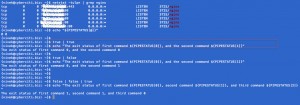
Fig.02: Use the PIPESTATUS array to get the exit status of each element of the pipeline (click to enlarge)
Putting it all together
Here is a sample script that use ${PIPESTATUS[0]} to find out the exit status of mysqldump command in order to notify user on screen about database backup status:#!/bin/bash
### Purpose: mysql.backup.sh : Backup database ###
### Author: Vivek Gite, under GPL v2.x+ or above. ###
### Change as per your needs ###
MUSER='USERNAME-here'
MPASS='PASSWORD-here'
MHOST='10.0.3.100'
DEST="/nfs42/backups/mysql"
NOWFORMAT="%m_%d_%Y_%H_%M_%S%P"
MYSQL="/usr/bin/mysql"
MYSQLDUMP="/usr/bin/mysqldump"
MKDIR="/bin/mkdir"
RM="/bin/rm"
GZIP="/bin/gzip"
DATE="/bin/date"
SED="/bin/sed"
# Failsafe? Create dir #
[ ! -d "$DEST"]&& $MKDIR -p "$DEST"
# Filter db names
DBS="$($MYSQL -u $MUSER -h $MHOST -p$MPASS -Bse 'show databases')"
DBS="$($SED -e 's/performance_schema//' -e 's/information_schema//'<<<$DBS)"
# Okay, let us go
for db in$DBS
do
tTime=$(date +"${NOWFORMAT}")
FILE="$DEST/${db}.${tTime}.gz"
$MYSQLDUMP -u $MUSER -h $MHOST -p$MPASS$db | $GZIP-9> $FILE
if[ ${PIPESTATUS[0]} -ne "0"];
then
echo"The command $MYSQLDUMP failed with error code ${PIPESTATUS[0]}."
exit1
else
echo"Database $db dump successfully."
fi
done
A note about zsh user
Use the array called pipestatus as follows:Outputs:
true | true
echo"${pipestatus[1]} ${pipestatus[2]}"
0 0