http://www.linuxtechi.com/configure-hostname-on-centos-7-and-rhel-7
Hostname is defined as label or name of a computer and network device. In this article we will discuss how to set and modify hostname on CentOS 7 & RHEL 7. There are three different commands through which we can query, set and modify hostname.
# hostnamectl
Let’s set the static hostname ‘cloud.linuxtechi.com‘
![hostnamectl-command-output]()
Remove or clear the hostname (cloud.linuxtechi.com)
![hostnamectl-transisent]()
Remove Pretty hostname :
Syntax :
# hostnamectl set-hostname -H @
Above command will use ssh for connecting and authentication for remote server.
![nmtui-command]()
![set-hostname-nmtui]()
![numtui-ok-option]() Restart the hostnamed service
Restart the hostnamed service
Check the hostname :
Syntax :
# nmcli general hostname
Hostname is defined as label or name of a computer and network device. In this article we will discuss how to set and modify hostname on CentOS 7 & RHEL 7. There are three different commands through which we can query, set and modify hostname.
- hostnamectl
- nmtui
- nmcli
- Static Hostname — It is conventional hostname that we set on the servers and as the name suggest hostname will be static and persistent accross the reboot.Static hostname is stored in the file /etc/hostname.
- Transient Hostname — It is the hostname which is obtained from DHCP and mDNS. Transient hostname might be temporary because it is only temporarily written to kernel hostname.
- Pretty Hostname — It is a hostname that can include all kind of special characters. Pretty hostname is stored in the file /etc/machine-info .
[root@localhost ~]# hostname
OR
[root@localhost ~]# hostnamectl status
OR
[root@localhost ~]# hostnamectl
hostnamectl command :
hostnamectl command is used to configure,modify and query hostname. Basic syntax is listed below :# hostnamectl
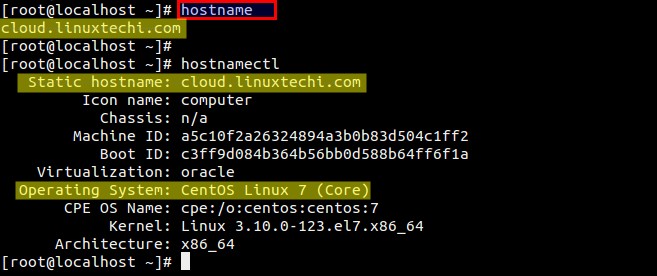
Let’s set the static hostname ‘cloud.linuxtechi.com‘
[root@localhost ~]# hostnamectl set-hostname "cloud.linuxtechi.com"Verify the new hostname using hostnamectl and hostname command :
[root@localhost ~]#
Remove or clear the hostname (cloud.linuxtechi.com)
[root@cloud ~]# hostnamectl set-hostname ""Set Pretty Hostname :
[root@cloud ~]#
[root@cloud ~]# hostname
localhost.localdomain
[root@cloud ~]# hostnamectl
Static hostname: n/a
Transient hostname: localhost
Icon name: computer
Chassis: n/a
Machine ID: a5c10f2a26324894a3b0b83d504c1ff2
Boot ID: c3ff9d084b364b56bb0d588b64ff6f1a
Virtualization: oracle
Operating System: CentOS Linux 7 (Core)
CPE OS Name: cpe:/o:centos:centos:7
Kernel: Linux 3.10.0-123.el7.x86_64
Architecture: x86_64
[root@cloud ~]#
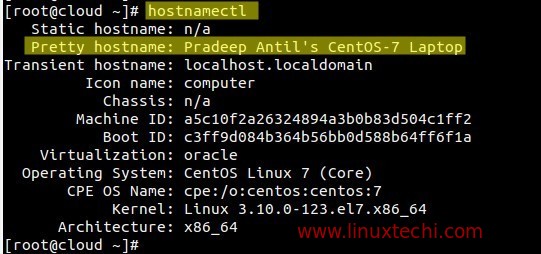
[root@cloud ~]# hostnamectl set-hostname "Pradeep Antil's CentOS-7 Laptop" --pretty
[root@cloud ~]#
Remove Pretty hostname :
[root@cloud ~]# hostnamectl set-hostname "" --prettySet Hostname on the Remote Server from your local machine.
Syntax :
# hostnamectl set-hostname -H
Above command will use ssh for connecting and authentication for remote server.
root@linuxworld:~# hostnamectl set-hostname -H 192.168.1.13 @cloud.linuxtechi.com
root@192.168.1.13's password:
root@linuxworld:~#
nmtui command :
nmtui stands for ‘Network Manager Text User Interface‘, it is a text user interface which is used to configure hostname.
When we type nmtui command below window will appear
[root@cloud ~]# nmtui
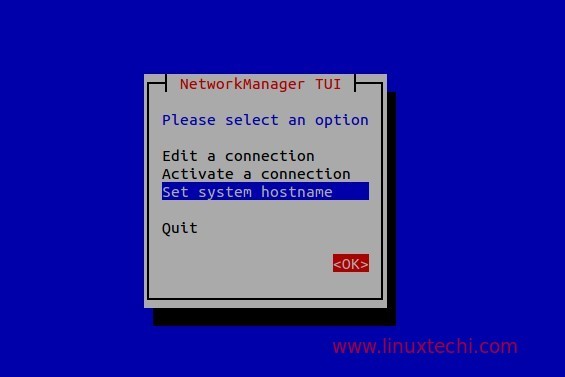
Select “Set system hostname” and then click on OK..
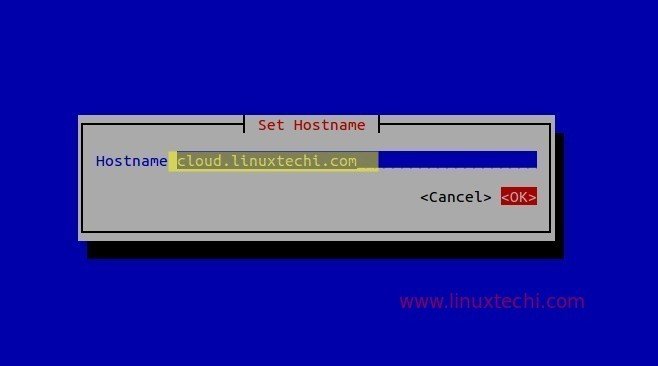
Type the hostname whatever you want to set and then click on OK.
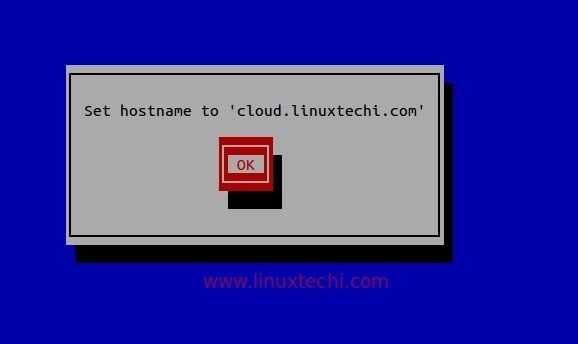
[root@cloud ~]# systemctl restart systemd-hostnamedVerify new hostname using ‘hostname’ & ‘hostnamectl’ command
[root@cloud ~]#
nmcli command :
nmcli is a command line utility for configuring and query hostname.Check the hostname :
[root@cloud ~]# nmcli general hostnameChange the hostname :
cloud.linuxtechi.com
[root@cloud ~]#
Syntax :
# nmcli general hostname
[root@cloud ~]# nmcli general hostname antil.linuxtechi.comRestart the hostnamed service using below systemctl command
[root@cloud ~]# systemctl restart systemd-hostnamedNote :hostnamectl command is recommended to query and configure hostname.
[root@cloud ~]# hostname
antil.linuxtechi.com
[root@cloud ~]#